How to know Social Media Image Size 2026(Facebook, Youtube and Instagram)
Understanding the correct social media image sizes is essential if you want your content to look professional across platforms. However, many creators still struggle with images getting cropped, stretched, or losing quality after uploading. This usually happens because the image dimensions don’t match platform requirements. As a result, even well-designed visuals can appear unpolished.
In this guide, you’ll learn the updated social media image sizes for 2026. In addition, you’ll understand how to avoid common mistakes and maintain consistent quality across platforms like Instagram, YouTube, and Facebook.
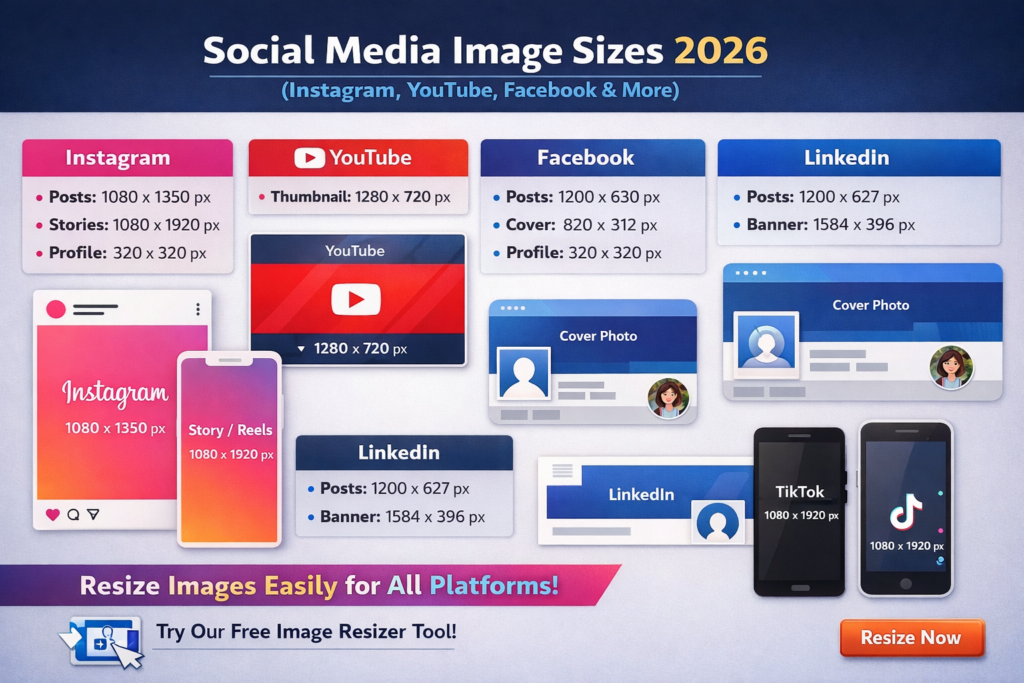
Why Using Correct Social media Image Sizes Matters
Using the correct image dimensions is not just about appearance. In fact, it directly affects how your content performs across platforms.
When your images are properly sized, they appear sharper and more balanced. As a result, your content looks more professional and is easier to consume. On the other hand, incorrect sizes often lead to cropping issues, which can remove important parts of your design.
Moreover, consistent sizing helps build a strong visual identity. Over time, this improves how people recognize and trust your content.
When you create content for different platforms, small changes can make a big difference. For example, using the right image size helps your design look clear and balanced. However, many creators skip this step and upload images without checking dimensions. As a result, parts of the image get cut off or look stretched. To fix this, adjust your images before uploading. This simple step improves quality and makes your content look more professional.
Instagram Image Sizes (Posts, Stories, Reels)
Instagram is a visual platform, so correct sizing plays a big role in performance.
Instagram Post Size
Instagram supports different post formats. However, each format works best in a specific situation.
The square size (1080 × 1080 px) is the most common. It works well for general content and keeps things simple.
The portrait size (1080 × 1350 px) is often better for reach. This is because it takes up more space on mobile screens. As a result, it can increase engagement.
The landscape size (1080 × 566 px) is useful for wider visuals. However, it usually gets less attention since it takes up less screen space.
What is the Instagram Story size?
Stories are designed for full-screen vertical viewing. Always keep important text and elements centered to avoid being cut off by interface overlays.
For stories, the ideal dimension is 1080 × 1920 px. Since stories are full-screen, proper alignment becomes very important.
What is the Instagram Reels size?
Reels follow the same format as stories, which is 1080 × 1920 px.
However, reels stay on your profile longer. Because of this, you should pay more attention to layout and spacing. Important content should not be too close to the edges.
Instagram profile picture size
The ideal size is 320 × 320 px.
Since the image appears as a circle, make sure your logo or subject is centered. Otherwise, parts of it may get cut off.
YouTube Image (Thumbnail, Banner, Profile)
YouTube visuals play a huge role in attracting clicks and building your brand.
What is the YouTube thumbnail size?
The recommended size is 1280 × 720 px with a 16:9 ratio.
Thumbnails play a big role in getting clicks. Therefore, it is important to use clear images with strong contrast and easy-to-read text.
What is the YouTube banner size?
The correct size is 2560 × 1440 px.
However, not all parts are visible on every device. The safe area (1546 × 423 px) is what shows everywhere. So, keep your text and logo inside this area.
YouTube profile picture size
- 800 × 800 px
This appears across your channel and comments, so clarity is important.
Facebook Image (Posts, Cover, Story)
Facebook supports multiple formats, and using the right sizes ensures consistency across devices.
What is the Facebook post image size?
- 1200 × 630 px
This size works well for both desktop and mobile displays.
What is the Facebook cover photo size?
- Desktop: 820 × 312 px
- Mobile: 640 × 360 px
Because the display changes between devices, it’s best to keep important elements centered.
Facebook Story size
- 1080 × 1920 px
Same format as Instagram Stories and Reels.
Facebook profile picture size
- 320 × 320 px
Displayed as a circle, so maintain proper alignment.
LinkedIn Image (Professional Content)
LinkedIn is used for professional content, so clean visuals matter even more.
The post size should be 1200 × 627 px.
This works well in the feed. The banner size is 1584 × 396 px. It should be simple and well-aligned.
The profile picture size is 400 × 400 px. A clear image helps build trust.
TikTok Image & Video Sizes
TikTok is focused on vertical content, similar to Instagram Reels.
TikTok video size
- 1080 × 1920 px (9:16)
This ensures full-screen display and better engagement.
TikTok profile picture size
- 200 × 200 px
Resize Images for Social Media (Easy Method)
Remembering all these sizes can be difficult, especially if you’re managing multiple platforms.
Instead of resizing images manually every time, you can use a simple tool to automate the process.
Use our Image Resizer Tool to instantly adjust your images for Instagram, YouTube, Facebook, and more.
This ensures your images are always perfectly sized without losing quality.
Pro Tips for Best Results
- Always start with high-resolution images
- Keep important text in the center (safe area)
- Maintain the correct aspect ratio
- Test visuals on both mobile and desktop
- Avoid over-compressing your images
Final Thoughts
Using the correct social media image sizes may seem like a small detail. However, it plays a significant role in how your content is perceived.
When your visuals are properly sized, they appear cleaner, more professional, and more engaging. As a result, your content stands out more in crowded feeds.
Therefore, keeping these dimensions in mind and applying them consistently will help you improve both quality and performance over time.
Looking to improve your workflow? Check out our guide on best video editing software and AI tools.